Got to check out the new lens on Squidoo on SAP Training

SAP SD Training
SD stands for Sales & Distribution. This module of SAP deals with the handling of sales, distribution of goods/services, warehouse interaction, packaging, billing, pricing, invoicing, order management, customer management etc.
For quality SAP SD Training, please visit Magna Training.


How are certian printers locked in QA and DEV environments..?
While running a production system, QA and DEV systems have access to the production printers also. In order to clog printers used in production , they can be locked from issuing outputs in different environments.
For example , printer US10 can be locked to in QA and DEV environments but only made active in PROD environment.

Field Modifications
1. How to selectively grey out a field in VA01/02 ?
User Exit USEREXIT_FIELD_MODIFICATION
This exit is processed for EVERY field in the screen.
eg., Submitted date/time is entered here when creating the quote. In change mode this field by default is editable. The business required that this field should not be editable later after
the quote is created.
The following code is written to accomplish this.
if t180-trtyp eq 'V' and vbak-auart ne 'ZQTE' and ( screen-name = 'VBAK-MAHDT' or
screen-name = 'VBAK-BSTZD' ).
data: w_mahdt like vbak-mahdt.
data: w_bstzd like vbak-bstzd.
clear: w_mahdt, w_bstzd. "Submitted Date and Time fields
select single mahdt bstzd " Select the actual fields from the document.
from vbak
into (w_mahdt, w_bstzd)
where vbeln = vbak-vbeln.
if ( not w_mahdt is initial )
and ( not w_bstzd is initial ).
screen-input = 0. " This is what makes the fields grayed out.
endif.
endif.
Static vs Dynamic Credit Check
Static :: Combined value of
- Open Orders {Orders not yet delivered}
- Open Deliveries {Deliveries not yet invoiced}
- Open Invoices {Invoices not forwarded to Accounting}
- Open A/R Items
- Dynamic Part {Open Order Value}
- Open Deliveries
- Open Invoices
- Open A/R Items
More Details on SAP Credit Management and SAP SD Training here.
Where are text objects maintained ?
SO10. These text objects are extensively used in SAP Script and SMARTFORMS. SAP Text Determination in SD can be used to configure the way texts flow through in SAP SD. Visit SAP SD Training for full fledged SAP Training in Sales and Distribution Functional Module

How to customize the incompletion log ?
Simple customizations possible in incompletion log are given below.
For full fledged SAP SD Training or for other SAP Training please visit Magna Training.
- I wanted to make the submitted date and time (Additional data B-> MAHDT(date) and BSTZD(time)) mandatory only for Quotations (ZQT) and sales orgs (USXX/CAYY). This cannot be achieved through incompletion log configuration. The core piece of code is highlighted. The rest of it is validations.
- The basic structure for customizing incompletion log is XVBUV
- The code is as follows in the user exit USEREXIT_CHECK_VBAK
- IF ( vbak-mahdt IS INITIAL
OR vbak-bstzd IS INITIAL ).
IF ( vbak-vkorg = 'USXX'
OR vbak-vkorg = 'CAYY' )
AND vbak-auart = 'ZQT'
AND sy-tcode = 'VA21'.
IF vbak-mahdt IS INITIAL.
read table xvbuv with key fdnam = 'MAHDT'.
if sy-subrc <> 0.
XVBUV-MANDT = SY-MANDT.
XVBUV-VBELN = VBAK-VBELN.
XVBUV-POSNR = '000000'.
XVBUV-ETENR = '0000'.
XVBUV-TBNAM = 'VBAK'.
XVBUV-FDNAM = 'MAHDT'.
if vbak-auart = 'ZQT'.
XVBUV-FEHGR = '90'.
endif.
XVBUV-STATG = '01'.
XVBUV-FCODE = 'KZKU'.
XVBUV-SORTF = '9999'.
XVBUV-LFDNR = '0000'.
APPEND XVBUV.
FORCE_UPDATE = 'X'.
endif.
else.
read table xvbuv with key fdnam = 'MAHDT'.
if sy-subrc = 0.
delete xvbuv where fdnam = 'MAHDT'.
endif.
endif.
clear xvbuv.
IF vbak-bstzd IS INITIAL.
read table xvbuv with key fdnam = 'BSTZD'.
if sy-subrc <> 0.
XVBUV-MANDT = SY-MANDT.
XVBUV-VBELN = VBAK-VBELN.
XVBUV-POSNR = '000000'.
XVBUV-ETENR = '0000'.
XVBUV-TBNAM = 'VBAK'.
XVBUV-FDNAM = 'BSTZD'.
if vbak-auart = 'ZQT'.
XVBUV-FEHGR = '90'.
endif.
XVBUV-STATG = '01'.
XVBUV-FCODE = 'KZKU'.
XVBUV-SORTF = '9999'.
XVBUV-LFDNR = '0000'.
APPEND XVBUV.
FORCE_UPDATE = 'X'.
endif.
else.
read table xvbuv with key fdnam = 'BSTZD'.
if sy-subrc = 0.
delete xvbuv where fdnam = 'BSTZD'.
endif.
endif.
clear xvbuv.
ELSE.
ENDIF.
ENDIF
How to create SAP GUI shortcuts with passwords ?
SAP generally does not suggest that passwords be stored in shortcuts. So it is disabled by default. On the windows GUI , here is a method to enable SAP passwords to be stored in shortcuts.
1. Log on to the GUI.
2. Click on the shortcut icon.
3. The password field of the shortcut is normally grayed out. To enable it go-to step 4. 4.
4.1 Register the parameter for the shortcut (sapshcut is available in the SAP GUI directory SAP\Frontend\SAPGUI in GUI 6.2 ).
sapshcut -register
4.2 In HKEY_CURRENT_USER->Software->SAP->SAPShortcut->Security
set the key "Enable Password" to "1"
4.3 Restart if required.
What is the role of "Parameter ID" in the user profile ?
Parameter IDs are a list of parameters that can stored in memory for a particular login. It can be used in multiple ways. One common use of it is to store commonly used fields in screens to be prefilled based on user preferences. Not all fields in SAP screens have a parameter ID.
[su3]>parameters tab
The correct parameter ID of a field in the SAP screen can be picked up as follows. Whether a field in SAP is displayed based on the parameter ID of the user settings is based on the screenpainter settings of that screen. If the field is set to display the parameter ID , then it is displayed based on the settings in the user profile.
What are user status and system status ?
SAP SD Training
SAP Training
SAP Status Profile Tutorial
Both at the sales doc header level (Sales type) and item level (Item categlory) a status profile can be assigned. A status profile holds a set of statuses for a sales document. So a user can take a document header/line item through multiple statuses based on her role.
Lets start with status profile assignment at sales type and item category levels.
[VOV8]
If statuses are needed at item level , assign a status profile to the item category.
[VOV7]
Now lets start buy defining a status profile.
[spro]>IMG>S&D>Sales Documents>Define and Assign Status Profile.
1. Define Status Profile.
Each of the statuses are defined here. The first column is the status number . It defines the sequence in which the statuses can be set. It is definitely not necessary that the statuses go through that order all along. Whether a new status can be set in the order can be determined by
- The lowest and highest status number as defined for that status. Normally the initial status field(here ZSH1 is checked as the default status. That would be the status when the order is created by default). The highest status determines the status number line that the status can be changed to. For example if the status is currently set to status line ZRRR(which has a highest status of 40) a staus of ZERR(staus line 50) cannot be set becuase the highest status line that a status can be transitioned to is based on the highest status of the current status. Similarly the lowest status determines if the new status number is >= current statuses' lowest status. For example , if the current status is ZRRR , the status cannot be set to ZHLD (status line 20) since the lowest status of ZRRR is 30.
- User authorization code. Change of statuses can be restricted to be performed by a user based on authorization code. So in this case ZREL can only be set by a user with a REVREC auth code.
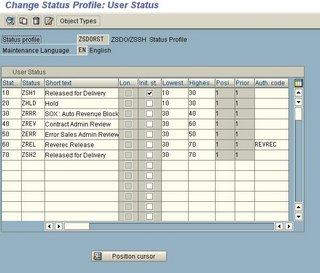

There is another feature of a status profile. A status on a header or item level in a sales document can determine which transactions can be performed and which cannot. double click on status line 20 in the picture above and you will be taken to the transaction control of the status profile.

The business transactions are listed and for each of the transactions , the characterstics of the status is shown in the radio boxes.
- No influence ( If the document is in that particular status , then there is no influence on that particular transaction)
- Permitted ( If the document is in that particular status , then that business transaction is permitted)
- Warning ( If the document is in that particular status , then when that business transaction is conducted a warning message is issued)
- forbidden (If the document is in that particular status , then that business transaction is forbidden to be performed on that document)
- No Action
- Set (When that transaction is performed on the document , then that particular user status is set by default)
What is SAPConnect ?
SAPConnect is an inbuilt communication interface for external communication like email (SMTP server) , FAX , paging etc. In normally has generic RFC based interfaces for standard communication methods like emails , faxes etc.
SAPConnect as of Web AS 6.1+ offers a standard inbuilt SMTP plug-in ,standard FAX interface and a standard HTTP interface. It can also be used to interface with standard external FAX servers.
[SCOT] is the tcode for viewing SAPConnect screens.
[SCOT] > view > Routing will bring up the following screen. It will show all the communication methods used and any specific routing rules applied.
In the menu are also options to test and trace routing , view all sent/waiting/transmitted requests etc. There is also email blocking functionality. The blanked out emails in the picture are the only domains to which emails can be sent. This can be configured as shown below. Standard routing logic for smtp/fax etc need to be specified. For example, double-clicking on the SMTP button gives the following options where the routing needs to be configured
Outgoing communication statuses like those for emails /faxes can be monitored in the queue as shown below.
ABAP debugging for messages
Whenever a message(warning/error/message) appears on the bottom of the SAP GUI , and if it needs to be found out where/why the message is coming from in the code, instead of debugging from the very beginning , set a break-point on the statement "message" and continue processing the transaction.

When the appropriate message statement is encountered, the debugger automatically stops. This is a better and faster way of debugging when the actual statement at which the breakpoint needs to be set is known.

User Exits in Sales
Most of the user exits are in MV45AFZZ. This is one of the include programs in the main VA0x program SAPMV45A. The user exits and the corresponding explanations are given below.
- USEREXIT_DELETE_DOCUMENT ----> When a sales document is deleted , this is the call back where any side-kicks to the sales document can be deleted. For example a for every sales document created
Subscribe to:
Posts (Atom)
