Why do certian UoMs come with decimals and some dont ?
For example , in this snapshot of the line-items in an order , UoM of EA has decimals whereas PC doesnt. The difference lies in the config of those units of measure in spro as shown below.

How to customize the incompletion log ?
Simple customizations possible in incompletion log are given below.
For full fledged SAP SD Training or for other SAP Training please visit Magna Training.
- I wanted to make the submitted date and time (Additional data B-> MAHDT(date) and BSTZD(time)) mandatory only for Quotations (ZQT) and sales orgs (USXX/CAYY). This cannot be achieved through incompletion log configuration. The core piece of code is highlighted. The rest of it is validations.
- The basic structure for customizing incompletion log is XVBUV
- The code is as follows in the user exit USEREXIT_CHECK_VBAK
- IF ( vbak-mahdt IS INITIAL
OR vbak-bstzd IS INITIAL ).
IF ( vbak-vkorg = 'USXX'
OR vbak-vkorg = 'CAYY' )
AND vbak-auart = 'ZQT'
AND sy-tcode = 'VA21'.
IF vbak-mahdt IS INITIAL.
read table xvbuv with key fdnam = 'MAHDT'.
if sy-subrc <> 0.
XVBUV-MANDT = SY-MANDT.
XVBUV-VBELN = VBAK-VBELN.
XVBUV-POSNR = '000000'.
XVBUV-ETENR = '0000'.
XVBUV-TBNAM = 'VBAK'.
XVBUV-FDNAM = 'MAHDT'.
if vbak-auart = 'ZQT'.
XVBUV-FEHGR = '90'.
endif.
XVBUV-STATG = '01'.
XVBUV-FCODE = 'KZKU'.
XVBUV-SORTF = '9999'.
XVBUV-LFDNR = '0000'.
APPEND XVBUV.
FORCE_UPDATE = 'X'.
endif.
else.
read table xvbuv with key fdnam = 'MAHDT'.
if sy-subrc = 0.
delete xvbuv where fdnam = 'MAHDT'.
endif.
endif.
clear xvbuv.
IF vbak-bstzd IS INITIAL.
read table xvbuv with key fdnam = 'BSTZD'.
if sy-subrc <> 0.
XVBUV-MANDT = SY-MANDT.
XVBUV-VBELN = VBAK-VBELN.
XVBUV-POSNR = '000000'.
XVBUV-ETENR = '0000'.
XVBUV-TBNAM = 'VBAK'.
XVBUV-FDNAM = 'BSTZD'.
if vbak-auart = 'ZQT'.
XVBUV-FEHGR = '90'.
endif.
XVBUV-STATG = '01'.
XVBUV-FCODE = 'KZKU'.
XVBUV-SORTF = '9999'.
XVBUV-LFDNR = '0000'.
APPEND XVBUV.
FORCE_UPDATE = 'X'.
endif.
else.
read table xvbuv with key fdnam = 'BSTZD'.
if sy-subrc = 0.
delete xvbuv where fdnam = 'BSTZD'.
endif.
endif.
clear xvbuv.
ELSE.
ENDIF.
ENDIF
How to create SAP GUI shortcuts with passwords ?
SAP generally does not suggest that passwords be stored in shortcuts. So it is disabled by default. On the windows GUI , here is a method to enable SAP passwords to be stored in shortcuts.
1. Log on to the GUI.
2. Click on the shortcut icon.
3. The password field of the shortcut is normally grayed out. To enable it go-to step 4. 4.
4.1 Register the parameter for the shortcut (sapshcut is available in the SAP GUI directory SAP\Frontend\SAPGUI in GUI 6.2 ).
sapshcut -register
4.2 In HKEY_CURRENT_USER->Software->SAP->SAPShortcut->Security
set the key "Enable Password" to "1"
4.3 Restart if required.
What is the role of "Parameter ID" in the user profile ?
Parameter IDs are a list of parameters that can stored in memory for a particular login. It can be used in multiple ways. One common use of it is to store commonly used fields in screens to be prefilled based on user preferences. Not all fields in SAP screens have a parameter ID.
[su3]>parameters tab
The correct parameter ID of a field in the SAP screen can be picked up as follows. Whether a field in SAP is displayed based on the parameter ID of the user settings is based on the screenpainter settings of that screen. If the field is set to display the parameter ID , then it is displayed based on the settings in the user profile.
What are user status and system status ?
SAP SD Training
SAP Training
SAP Status Profile Tutorial
Both at the sales doc header level (Sales type) and item level (Item categlory) a status profile can be assigned. A status profile holds a set of statuses for a sales document. So a user can take a document header/line item through multiple statuses based on her role.
Lets start with status profile assignment at sales type and item category levels.
[VOV8]
If statuses are needed at item level , assign a status profile to the item category.
[VOV7]
Now lets start buy defining a status profile.
[spro]>IMG>S&D>Sales Documents>Define and Assign Status Profile.
1. Define Status Profile.
Each of the statuses are defined here. The first column is the status number . It defines the sequence in which the statuses can be set. It is definitely not necessary that the statuses go through that order all along. Whether a new status can be set in the order can be determined by
- The lowest and highest status number as defined for that status. Normally the initial status field(here ZSH1 is checked as the default status. That would be the status when the order is created by default). The highest status determines the status number line that the status can be changed to. For example if the status is currently set to status line ZRRR(which has a highest status of 40) a staus of ZERR(staus line 50) cannot be set becuase the highest status line that a status can be transitioned to is based on the highest status of the current status. Similarly the lowest status determines if the new status number is >= current statuses' lowest status. For example , if the current status is ZRRR , the status cannot be set to ZHLD (status line 20) since the lowest status of ZRRR is 30.
- User authorization code. Change of statuses can be restricted to be performed by a user based on authorization code. So in this case ZREL can only be set by a user with a REVREC auth code.
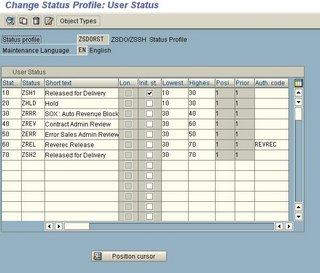

There is another feature of a status profile. A status on a header or item level in a sales document can determine which transactions can be performed and which cannot. double click on status line 20 in the picture above and you will be taken to the transaction control of the status profile.

The business transactions are listed and for each of the transactions , the characterstics of the status is shown in the radio boxes.
- No influence ( If the document is in that particular status , then there is no influence on that particular transaction)
- Permitted ( If the document is in that particular status , then that business transaction is permitted)
- Warning ( If the document is in that particular status , then when that business transaction is conducted a warning message is issued)
- forbidden (If the document is in that particular status , then that business transaction is forbidden to be performed on that document)
- No Action
- Set (When that transaction is performed on the document , then that particular user status is set by default)
What is SAPConnect ?
SAPConnect is an inbuilt communication interface for external communication like email (SMTP server) , FAX , paging etc. In normally has generic RFC based interfaces for standard communication methods like emails , faxes etc.
SAPConnect as of Web AS 6.1+ offers a standard inbuilt SMTP plug-in ,standard FAX interface and a standard HTTP interface. It can also be used to interface with standard external FAX servers.
[SCOT] is the tcode for viewing SAPConnect screens.
[SCOT] > view > Routing will bring up the following screen. It will show all the communication methods used and any specific routing rules applied.
In the menu are also options to test and trace routing , view all sent/waiting/transmitted requests etc. There is also email blocking functionality. The blanked out emails in the picture are the only domains to which emails can be sent. This can be configured as shown below. Standard routing logic for smtp/fax etc need to be specified. For example, double-clicking on the SMTP button gives the following options where the routing needs to be configured
Outgoing communication statuses like those for emails /faxes can be monitored in the queue as shown below.
ABAP debugging for messages
Whenever a message(warning/error/message) appears on the bottom of the SAP GUI , and if it needs to be found out where/why the message is coming from in the code, instead of debugging from the very beginning , set a break-point on the statement "message" and continue processing the transaction.

When the appropriate message statement is encountered, the debugger automatically stops. This is a better and faster way of debugging when the actual statement at which the breakpoint needs to be set is known.

User Exits in Sales
Most of the user exits are in MV45AFZZ. This is one of the include programs in the main VA0x program SAPMV45A. The user exits and the corresponding explanations are given below.
- USEREXIT_DELETE_DOCUMENT ----> When a sales document is deleted , this is the call back where any side-kicks to the sales document can be deleted. For example a for every sales document created
How to find out the technical objects in a Transport Request ? or vice-versa ?
1.Enter the corresponding Transport Request in [SE01]>Display tab.
2. Click the display button

The opposite of it is a little tricky. ie.,We know an object has been changed-lets say a table , view , or the contents and we want to find out which transport request changed it.
[SE01]. Goto> Objects in Requests. Now the type of object that has been modified has to be idenfied first. It could be a table definition, table content , views,programs, functions..etc.
 Once the right object type has been identified (for example table contents -- TABU , view data-- VIEW , table definition-- TABL) , enter that object in the object type along with the correct object type , specify any other restrictions like date range etc and F8.
What is tax classification ?
There are different kinds of taxes that are relevant for SD. The fundamental tax type that SD consultants need to worry abt is Sales Tax. There might also be further variations in Sales tax like VAT , state sales tax etc.
The basic premise for taxation is at the material and customer level. Certian materials might be tax-exempt. Certian customers might be tax-exempt(eg. resellers). Certian customers/materials might be partially taxable or with low-tax rates.
The tax category of the customer and material are set respectively in the customer/material master.
- Tax categories in Customer master
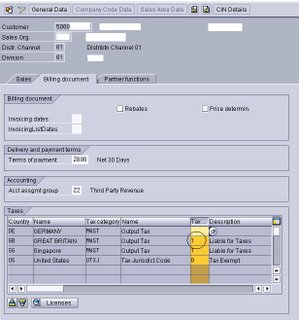
- The typical examples of tax classification are as 0- tax-exempt , 1- liable to taxes, etc
- The tax classification as computed in pricing(tax condition types with classification D or E)
- Tax Categories in Material master
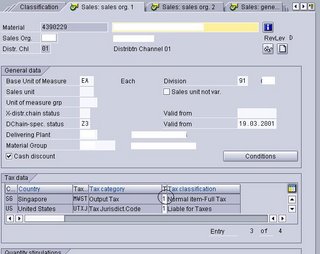


- The customers tax classification is trickled down to the sales document in the following order.
- Payer (if different from sold-to)
- Ship-to (if maintained)
- sold-to (if not maintained in ship-to)
- The material tax classification is straight forward.
- Tax classifications are also maintained at Country/Region(state) level.
So for example UTXJ tax condition type is based on the above combination of customer/material/country/region tax classifications.


When are output types triggered ?
The settings for when an output should be triggered are set at the following level
1. Manually do it in a sales document Click on the output type for which the output settings need to be viewed/changed.
 In the further data screen as shown below , there are 4 types of output triggers. The explanation is obvious as to what each type of trigger means. Each of them can be changed manually and a manually changed flag appears on the bottom of this screen.
 The configuration for this comes from 2 areas.
1. Condition type description In the general description of the condition type a number of options are available(eg, if an output can be fired multiple times etc)

The output triggering times are configured here.
2. The configuration at the configuration step of output types can be overrided at the condition record level for the corresponding output types.
Goto [VV13]


Subscribe to:
Posts (Atom)
